ChatGPT
 Perplexity
 Grok
 Claude

A large part of a support queue is questions that were answered before. Whenever the answer lives only in an agent's memory or in an old reply, it is written from scratch, and each rewrite is a chance for it to come out differently.
A customer service knowledge base is the place where those answers are written once, owned by someone, and read from both sides: by customers on a public portal and by agents inside the conversation. Writing the first articles is the easy part. Keeping a customer support knowledge base true after the product and the policies change is the work.
RolChat's documentation is the worked example, since it describes one complete model of roles, statuses, visibility and drafts fed by unanswered questions.
What a customer service knowledge base is for
Solve a problem without opening a conversation.
Answer faster, and answer the same way as the colleague on the next shift.
When one is connected, it draws on the same articles, which is one more reason for them to be right.
Agents are the reader that gets forgotten. A help center built only for customers can drift into marketing copy, and agents tend to fall back on their own saved replies. Then there are two sources of truth, and the one agents use is the one nobody reviews.
The job of the base is consistency first and deflection second.
If two agents give different answers about a refund, the base is the tiebreaker. If a customer finds the answer before writing in, nobody has to handle a conversation, but that only happens when the answer is findable and correct.
What to write first, following the customer's path
Start from the queue. Questions reach support in a rough order along the customer's path, and the base can be written in that same order.
Before buying, people ask what is included and how billing works. During setup they ask how to connect, import and invite colleagues. In daily use the questions are about doing one specific thing. When something breaks, they want troubleshooting. And on the account side there are invoices, plan changes and data requests.
The documentation's own example for a new portal uses three categories: Getting started, Billing and Troubleshooting. They cover the setup, billing and breakage questions above, and policies are the other content a knowledge base for customer support needs early.
Within each group, write what the queue asks most often. Read the last batch of conversations and sort them by what they opened with. The topic that opens the most gets the first article, even if it is dull.
One article answers one question. "Everything about billing" is harder to find, link and keep correct than four short pages, each titled the way a customer would type it.
Public and internal articles in one library
Every article carries a visibility: public, or internal for agents only. That one setting lets a single library serve both audiences without a second tool.
Split by what the reader may do with the content. A public article tells a customer how to solve something alone. An internal article tells an agent what the customer does not need: when to escalate, what to check first, which exceptions are allowed and who approves them.
Write the public version first. The internal one starts where the public one stops.
| Public article | Internal article | |
|---|---|---|
| Written for | The customer, acting alone | The agent, handling the case |
| Holds | Steps, expected results, what to do if it fails | Escalation path, exceptions, what to verify |
| Cost of an error | A customer follows wrong steps | An agent gives a wrong ruling |
| Reaches the customer | As a link or a portal page | Not meant to: the agent rewords it |
In a live chat the last row is the one that matters.
Public articles go out as links. An internal article is written for agents, so the safe habit is to put what it says into the reply in the agent's own words and leave its link out. The documentation says only that internal articles are for agents only, so the habit is advice and not a guarantee of how the product behaves.
Categories carry a visibility too, so a section of escalation procedures can be kept out of the customer's sight. Check the category's visibility before putting anything sensitive under it.
Structure, categories and what an article looks like
Categories nest, and each has an icon, a description, an order and a visibility. Resist nesting deeply. A good rule of thumb is two levels. A third level deserves a second look, since it often means the top level mirrors the company's org chart while the customer's problem got lost.
Name categories in the customer's words. "Billing" and "Troubleshooting" are searched for. "Revenue operations" is not. The portal can feature some categories on its home page, so choose the ones that match the first questions along the customer's path.
Inside the editor go headings, lists, tables, images up to 10 MB, callouts, code, embedded video and links between articles. An article that fits one question rarely needs most of that: a title phrased as the task, an opening line that answers it, the steps, and a callout for the one warning that matters. Links between articles earn their place when a step depends on another task.
Each article also takes tags, an SEO title and an SEO description. They matter on the public portal, whose pages are indexable by search engines unless the portal is marked private. Write the SEO title as the phrase a customer would search for.
Toggles in Settings arrange the portal around all of this, such as featured categories, popular this week, breadcrumbs, related articles, helpful votes and a language strip. RolChat's documentation states that every portal page meets WCAG 2.1 level AA.
Statuses, roles and who owns what
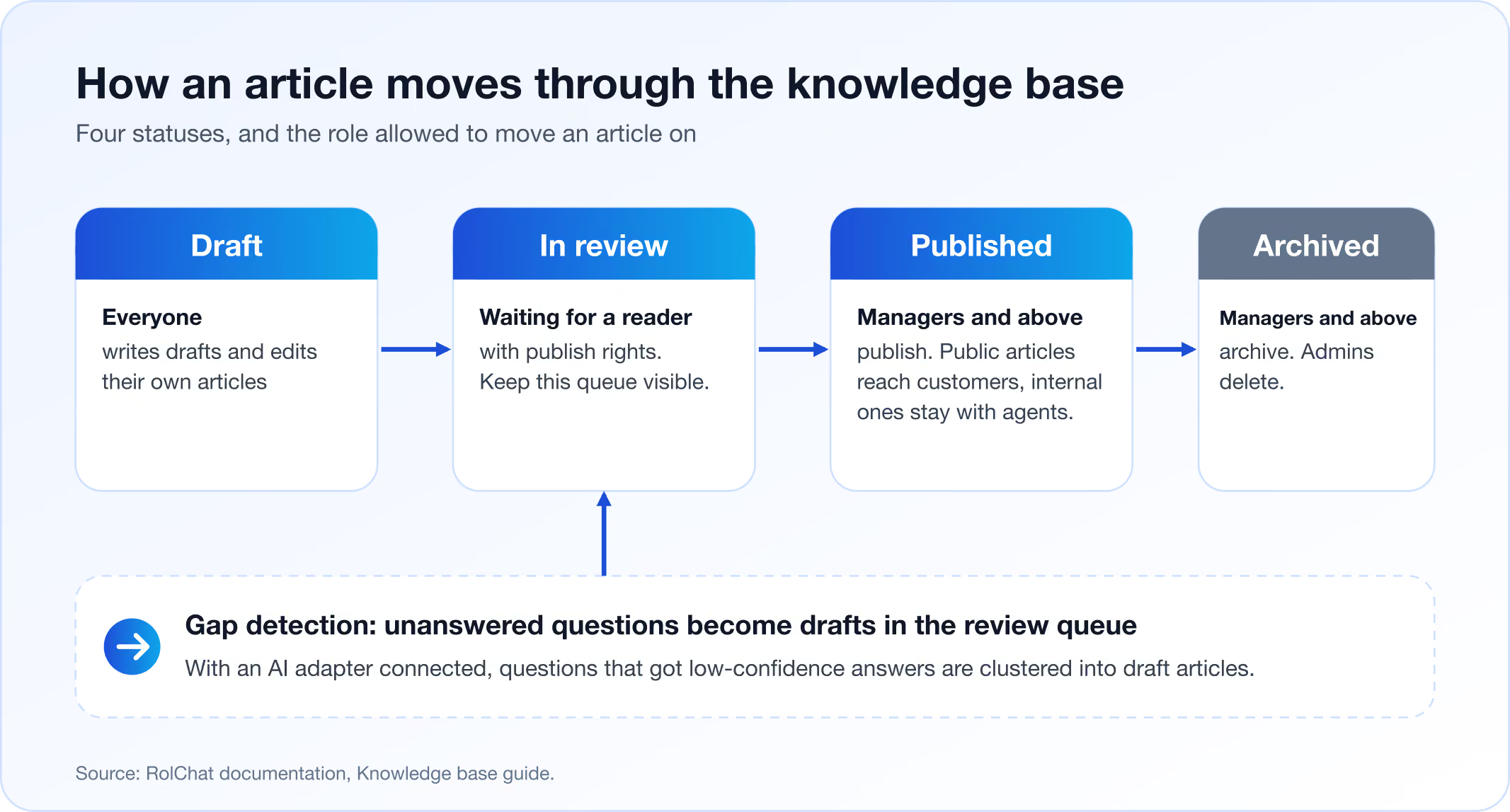
Every article is in one of four states: draft, in review, published or archived. The states are only useful when each one is tied to a person who is allowed to move an article out of it.
RolChat ties them to roles. Everyone can write drafts and edit their own. Managers and above edit other people's articles, publish, archive and manage categories. Admins delete articles and change portal settings.
Support suits that division well. The people who know the answer sit on the queue and can write it down at once. The people who answer for its accuracy sit one level up, and nothing reaches the portal until one of them publishes it.
In review is the status that says the writer is finished and nobody with publish rights has read it yet. Keep it visible. When drafts pile up there, the bottleneck is the reviewers, and more writing will not fix that.
Archived is where an article goes when it is no longer true but its history is worth keeping. Prefer it to deleting. Archive is a Manager action and delete is an Admin action, so the more drastic step sits with the more senior role.
Ownership is the part the statuses do not cover. Every article needs one named person or role who answers for it, because an article without an owner is one nobody notices going wrong. In a small team, an owner per category is enough. The documentation lists no owner field, only category, tags, SEO fields, visibility and status, so the owner has to live in a convention, such as a tag naming the owning team.
Keeping articles true
Accuracy decays at the moments the product changes, not on a calendar. So the review rhythm has two kinds of trigger.

One is an event. A release, a price change or a new policy sends someone through the articles that mention it. Whoever ships the change owns that sweep, and tags are what make it possible to find every article touching the subject.
Dates are the other. Articles about pricing, refunds, delivery and legal terms get a fixed review day, because nobody announces that a policy quietly stopped being true. How-to articles can wait for the next release.
Two sources of correction cost nothing. An article an agent distrusts is one that agent stops inserting, so ask which ones they have dropped and why. And the portal can show helpful votes, which gives a reader a way to say an article missed.
When an article is wrong, the fix belongs in the article. A corrected reply helps one customer, and a corrected article helps everyone who opens it afterwards.
Languages without a second library
An article can exist in several languages. The portal shows the visitor's language when a translation exists and falls back to the default when it does not, and a language strip lets readers switch. Search returns results in the reader's language first.
Translations can be written by hand or drafted with your AI provider. According to RolChat's help center page, drafted translations pass through review before they are published, so a machine draft waits for a person.
The fallback has a sharp edge, though. The portal shows the visitor's language whenever a translation exists, so a published translation that was not updated is shown in place of a corrected original. Nothing in the documentation says that a change to the source updates its translations, so treat them as stale until someone looks.
Keep the language list modest, then. Translate the articles at the start of the customer's path first, and add the rest only when someone owns them.
Using articles inside a live conversation
In the right panel of every conversation in the shared inbox sits a knowledge base search. Insert link drops a formatted link to the article into the composer, and Open shows the article to the agent.
Sending a link has an advantage over pasting the text. As long as the article stays published at the same address, an earlier link leads to the corrected version, while pasted text stays wrong in every conversation it was pasted into. The documentation does not say what a visitor sees at the address of an archived or unpublished article, so before archiving something agents link to often, open its link and see what comes up.
Search is a measuring device as well. An agent who searches and finds nothing has found a gap in the base, and so has one who finds an article and then has to correct it in the reply.
Ask whether the article an agent would paste into a reply is the one a customer would find on the portal. If agents keep their own versions, the base is a showcase that nobody works from.
What a visitor sees while typing
In the chat widget, the three best matching articles appear above the composer while a visitor types, so the answer is on screen while the question is still being written.
Titles are what a visitor reads first in that strip of three. Portal search is full text with typo tolerance, which forgives a misspelling and cannot supply a word the article never uses. A title phrased the way a customer would say it is understood at a glance, and one in internal vocabulary leaves the customer's own words unmatched.
When a visitor who finds the answer says so, Reports count it as a deflection: the customer got what they came for and no conversation was opened.
Turning unanswered questions into drafts
Gap detection closes the loop. With an AI adapter connected, questions that got low-confidence answers are clustered and turned into draft articles in the review queue, so the base grows from what customers actually ask.
The adapter is your own provider account, connected through the AI settings, and RolChat adds no charge for AI use. Without it, the rest of the knowledge base still works. What is lost is this loop, along with drafted translations and answers from the AI agent.
- Gap detection starts from questions that got a low-confidence answer.
- Similar questions are clustered, and a cluster is a signal that several customers asked the same thing.
- A draft lands in the review queue, where someone with publish rights reads it before anything reaches the portal.
- The owner decides what it is: a variant of an existing article, a defect to fix, or a real gap that needs a new article.
- It is published like any other article, under the usual statuses and roles.
Every draft is a prompt to write, and someone with publish rights still reads it before anything reaches the portal. Questions that got low-confidence answers are the raw material, so a cluster is a signal that several customers asked the same thing. Three outcomes sort the drafts quickly. A draft may be a variant of an article that already exists, and then the existing one needs a better title or a clearer opening line while the draft is archived. It may describe a defect that should be fixed instead of explained, and then the owner of the product hears about it and no article is written. Or it is a real gap, and then it gets an owner, a category and a place along the customer's path, and goes to review like any other article a person wrote by hand, under the same statuses and the same roles.
Teams without an adapter can run the manual version of the same loop. Collect the conversations where an agent searched and found nothing, group them by subject and write the biggest group first.
Your own domain: help.yourcompany.com
Switching the module on in Settings creates a portal at help.rolchat.com with your account slug. A help address on your own domain is a short addition: enter help.yourcompany.com, add a CNAME record pointing to portal.rolchat.com and press Verify. TLS is issued automatically, and the original address keeps working beside the new one.
One portal is included on every plan, and RolChat is priced per company, not per agent. There is a 30-day trial and no free plan, so a first portal can be tried with real articles during the trial, before any decision about a subscription. If the tool is still undecided, eleven knowledge base platforms are compared side by side. A team that keeps its internal wiki in Notion can also read how seven Notion alternatives split into wikis and help centers.
What not to put in a knowledge base
Credentials come first. Passwords, API keys, tokens and access links do not belong in any article, internal ones included, because internal means agents-only and is not the same as secret. Describe how to obtain access and leave the access itself out. Customer data stays out for the same reason: an article may describe a kind of case, but a real customer's name, order or account has no place in it.
- A policy nobody has decided yet: a draft written up as if it were final becomes the answer agents give, and the customer who was told it will quote it back.
- Anything that lasts a day, such as a fault fixed by tomorrow. That calls for a message to the affected customers, since an article would need an owner and a review.
- Paraphrases of legal documents, which go stale the day the document changes. Link to the document itself.
- A second article answering the same question as the first, because one of them will eventually disagree with the other.
What this guide leaves unmeasured
This guide gives no number for the questions a knowledge base removes or the time it saves.
Reports has a deflection count, and it has limits of its own. Per the documentation, it is counted when a visitor who found the answer says so. It does not show whether the answer was right, and it cannot see what a silent visitor did next.
Early data will be thin. That is no reason to wait: the structure, the owners and the status flow are worth having long before the numbers arrive to justify them.
Frequently asked questions
What are some good examples of knowledge bases?
Good examples cover product setup, billing and account questions, troubleshooting and policies, grouped under a few categories named in the customer's words. The better ones also keep a second layer of internal articles for agents, so escalation steps stay off the public page.
What is the best knowledge base?
No ranking holds for every team, so check criteria. Can everyone draft while only a few publish? Can one library hold public and internal articles? Can an agent drop an article into a live reply? Does the chat widget suggest articles while a visitor types? Can articles exist in several languages, and the portal sit on your own domain? Does a question nobody answered come back as a draft? Ask what that last one needs, because in RolChat it works only with an AI adapter connected.
What are some best practices for customer support?
For the knowledge base side of it, write each answer once, give it an owner and send the link. Support practice beyond the knowledge base is outside this guide.

Writes about customer support operations, live chat, AI-assisted service and the tooling behind great customer experience.
LinkedIn