ChatGPT
 Perplexity
 Grok
 Claude

What is RolChat? RolChat is a customer support platform at rolchat.com that puts website chat, email and Telegram into one shared inbox, with tickets, CRM contacts, a help center and AI reply drafts in the same web app. It is priced per company rather than per agent, and the first 300 companies can claim RolChat Lite free for 12 months.
With spelling correction on, a search for the name can come back as RoleChat, a set of roleplay chat sites and apps that has nothing to do with customer support. RolChat is the support platform made by Shifton Inc, a Florida corporation, and everything below describes that product only.
The rest covers what exists today, what is still marked coming soon, how the billing and AI model sit beside the words other vendors use for theirs, and what the Founding 300 offer contains.
What RolChat contains
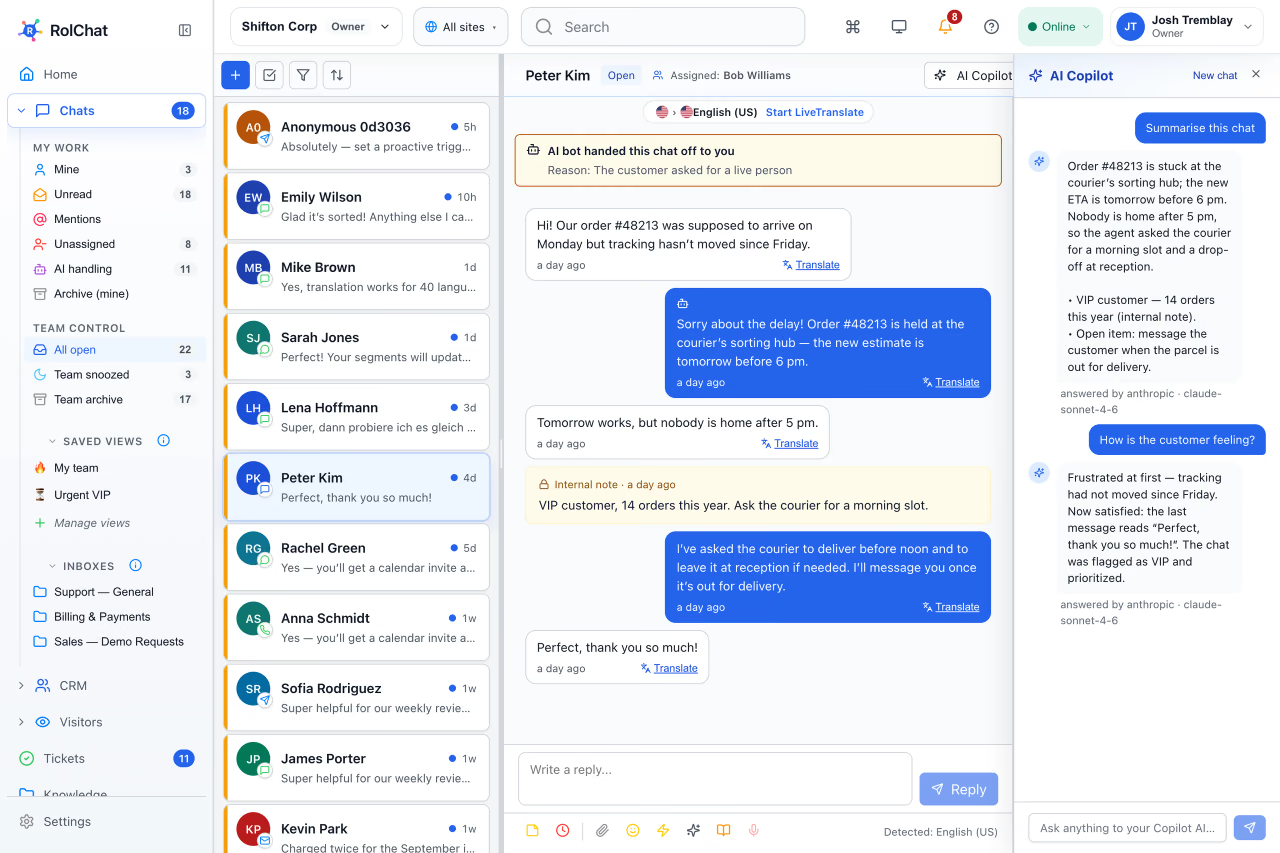
RolChat keeps a customer's messages, the customer's record and the team's answers in one workspace. The shared inbox receives website chat, email and Telegram on every plan, and any agent on the team can reply or turn a conversation into a ticket when it needs an owner and a status.
Each conversation is linked to a lead or a contact in the CRM, so the history stays beside the message. Visitors who are on the site can be seen while they browse. A help center, which is a knowledge base published on the company's own domain, comes with one portal on every plan. Automation runs on rules, five of them on Lite and ten on Standard, and a rule can pass an event to a connector platform, which the Zapier alternatives comparison covers.
Forty languages cover the interface and the chat widget. AI works inside the inbox: it drafts replies, translates a chat and summarizes it, and an agent reads each draft before it is sent.
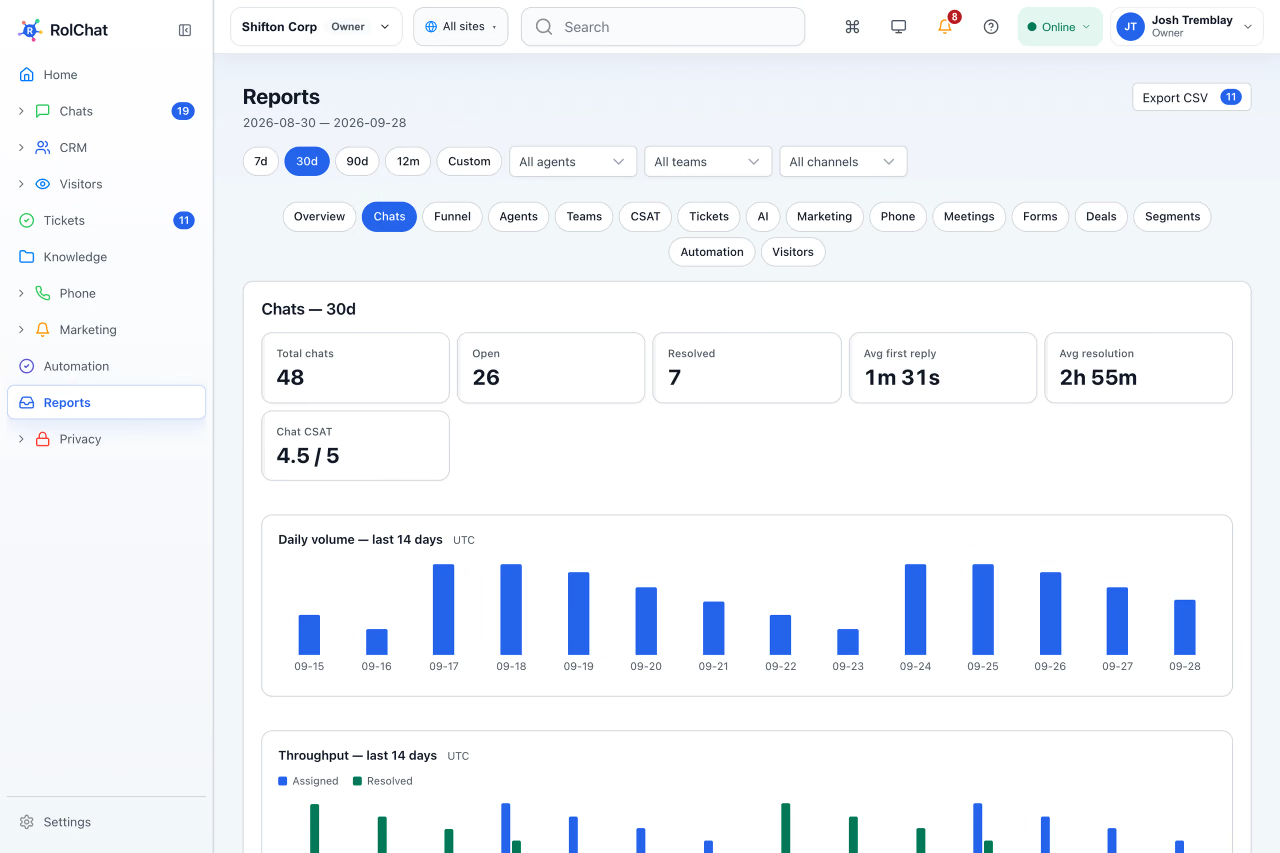
Reports cover chat volume, first reply time, resolution time and customer satisfaction. Lite has basic reports, and Standard has all of them.
Who RolChat is for
RolChat describes its audience as support teams that outgrew a shared mailbox. Its About page says thirteen industries have their own setup guides, among them ecommerce, SaaS, healthcare and insurance. The product does not depend on the sector. It depends on the size of the team and on how many channels it answers.
Lite. Website chat, email and Telegram in one inbox, with basic tickets, contacts and a knowledge base.
Standard. Adds WhatsApp, SMS, Facebook Messenger, Instagram, Viber and LINE, the full CRM, SLA policies and routing rules.
Enterprise is quoted individually, with unlimited agents and sites.
A team in this position faces a fork: keep the mailbox and add a chat tool, a ticket tool and a contact list around it, or move to one workspace. Every added tool brings its own customer list and its own seat count, and the lists drift apart.
Channels, and which plan carries them
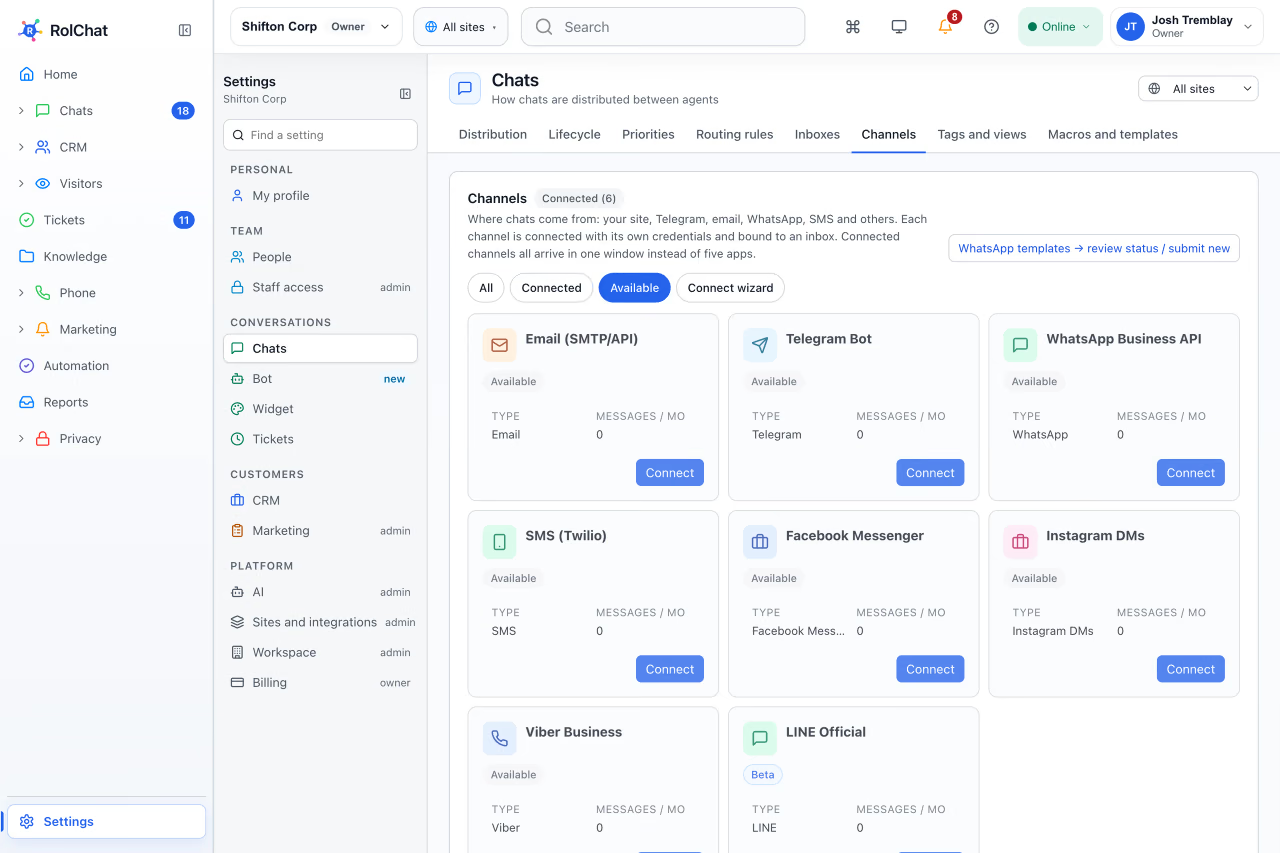
A shared inbox is only as useful as the channels that reach it. In RolChat the split is by plan, and it is stated on the channels page and on the pricing page.
| Channel | Lite | Standard |
|---|---|---|
| Website chat widget | Yes | Yes |
| Yes | Yes | |
| Telegram | Yes | Yes |
| No | Yes | |
| SMS | No | Yes |
| Facebook Messenger | No | Yes |
| No | Yes | |
| Viber | No | Yes |
| LINE (beta) | No | Yes |
Telegram connects through a bot that the company creates in Telegram, which is how the Telegram Bot API is meant to be used.
Setting channels by plan is not unique to RolChat. Crisp, for example, lists "Omnichannel inbox" with WhatsApp Business, Instagram DMs, SMS, Line and Viber under its Essentials plan, and Zendesk lists "Email and ticketing system" under Support Team and "Messaging and live chat" only from Suite Team. Intercom publishes "WhatsApp: Charged per message sent". What differs from vendor to vendor is which channels sit in the entry plan, and for RolChat that is website chat, email and Telegram.
AI on the company's own key
RolChat does not sell AI. The company opens an account with a provider, connects an API key from OpenAI, Anthropic, Google, xAI, DeepSeek, Qwen or MiniMax, and chooses the model. The provider bills the company for usage at its own price, and the pricing page states that nothing for AI is added to the RolChat invoice.
Before a feature is turned on, RolChat shows a calculator with the expected cost, and the choice of model stays with the company. On Lite the AI covers reply drafts, translation and summaries. The auto-reply bot and the tone of voice setting start at Standard.
Someone on the team has to create the provider account and the key, and usage cost moves with the volume of conversations. A Claude, ChatGPT or Gemini chat subscription is not an API key, so it cannot be connected. In exchange there is no RolChat markup and no per-answer fee from RolChat.
If conversation volume grows, a vendor-metered model gives a unit to forecast with, but the unit is defined by the vendor. An own-key model passes the provider's price straight through, which is transparent and also variable. The company decides which it would rather live with: a unit it can forecast and did not define, or a price it can read and cannot fix.
Per company, not per agent
RolChat sells one price for the whole company, with an agent limit and a site limit per plan. Under per-seat billing the invoice follows headcount. Under per-company billing it follows the plan and its limits, and the bill does not grow with the team inside the agent limit.
The question is not which tool is cheaper, but which number the bill follows.
Per-company pricing is not unique to RolChat. Crisp publishes "a flat rate per workspace" and also lets teams "add more seats". Zendesk, Intercom, Freshdesk and Tidio, in the table below, each name a different unit.
Each vendor cell is quoted from that vendor's own pricing page, read on 10 Nov 2026. No amounts are reproduced, and this is not a benchmark or an audit: vendor feature pages were not compared, and nothing said about a vendor goes beyond the lines quoted. Plans change, so confirm current terms on each vendor's site. Product names belong to their owners.
The table sets each vendor's own wording beside RolChat's model.
| Vendor | Billing unit in the vendor's words | How AI is measured in the vendor's words |
|---|---|---|
| Zendesk | "per agent, per month" | "Automated Resolutions" |
| Intercom | "per teammate" | "Fin outcomes" |
| Freshdesk | "/agent/month" | "A session" |
| Crisp | "a flat rate per workspace" | "AI Credits" |
| Tidio | "Billable conversation" | "A Lyro conversation" |
| RolChat | One price per company, with limits per plan | The provider's own usage, billed by the provider |
Three consequences follow from the table. A growing team on per-seat pricing sees the invoice rise with every hire, while on RolChat the invoice moves only when a limit is passed: from Standard, an extra agent is an add-on, and on Lite the answer to any limit is the next plan. AI cost is either forecast in a vendor's unit or paid through at the provider's price. And which option costs less depends on volume, which the table does not measure.
Where RolChat is not the answer yet
These are the boundaries that exist today.
- Telephony, IVR and call recording are coming soon, and so is Voice AI for call transcription and scoring.
- The Premium plan is reserved and not on sale yet.
- SMS campaigns are coming soon, although SMS already works as a support channel from Standard.
- On Lite the only add-on is the consent and privacy module. Extra agents, sites and storage start at Standard.
- AI needs the company's own API key, and LINE is in beta.
Intercom, for instance, lists "Phone: Usage-based" on its pricing page. A team that needs calls inside the same tool today should read that against the list above before choosing.
Founding 300: what the first 300 companies get
Founding 300 is a free year of RolChat Lite for the first 300 companies. It ends after 12 months, and the terms are public.
- Three agents on one website.
- A website chat widget and a shared inbox, with email and Telegram in the same inbox.
- CRM contacts and leads, tickets and a knowledge base for the company's site.
- A view of who is on the website, and five automation rules.
- 2 GB of file storage and basic reports.
- The inbox and the chat widget in 40 languages.
- AI reply drafts on the company's own key, from seven providers.
- A web app that works in the browser.
Some things stay outside the offer. WhatsApp, SMS and the other channels come with the higher plans, AI usage is billed by the company's own provider, and optional add-ons are paid. The stated reason is that RolChat wants 300 companies using the product and telling the team what to improve.
How a seat is claimed and kept
Four steps make a claim.
- Create a RolChat account with a verified email address.
- Open the support chat inside the app and ask for the Founding 300 year.
- RolChat moves the account to Lite, and the 12 months start from that moment.
- Paste one line of code into the site, or send it to whoever runs the site.
One free seat is given per company domain, for business use, and it belongs to the website domain the company registers. Disposable email domains are refused, and a seat can be ended for abuse. A seat counts as used when a team member signs in and works in the account, in the inbox, tickets, contacts, visitors or the help center, or when the widget loads on the registered domain. Either one, at least once every 30 days, keeps the seat, and the days are counted from the last use or from the day the seat was claimed. If neither happens, RolChat emails on day 21 and again on day 27. On day 30 the workspace turns read-only, the data can be exported and the seat returns to the pool for the next company, and on day 60 the data is deleted.
The end of the year comes with notice. Thirty days before it, RolChat emails the options: continue on Lite at 50% off for the second year, which is $9.50 a month, or leave and export the data. After the second year Lite is $19 a month.
Plans and what they cost
RolChat has a 30-day free trial and no free-forever plan. The pricing page lists every limit.
Lite is $19 a month per company for 3 agents and 1 website, and Standard is $49 a month for 10 agents and 5 websites. Paying yearly saves two months, and the price stays fixed while the subscription is active. Premium is marked coming soon and can be reserved but not bought, and Enterprise is quoted individually. From Standard, extra agents cost $5 a month each, extra sites $10 and 10 GB of extra storage $5, while the consent and privacy module is $5 a month per site on every plan.
Which route fits a team today
Plan limits settle most of the choice. A team of up to 3 agents on 1 website that needs nothing beyond the Lite channels fits Lite. A team that needs WhatsApp, SMS, Facebook Messenger, Instagram, Viber or LINE, or that has up to 10 agents and 5 websites, is looking at Standard, which is $49 a month.
Everything stated about RolChat here comes from its pricing page, its feature pages, the Founding 300 page, the About page and the legal page, as published on 10 Nov 2026. Anything said about another vendor stays inside the lines quoted in the callout above.
Asking for the Founding 300 year is the one decision with a limit on it, because the offer stops at 300 companies. A team that fits Lite can claim it after sign-up, from the support chat inside the app. A team that needs a Standard channel or more than 3 agents is choosing between the plan it needs now and a Lite year it would outgrow.
Frequently asked questions
What is RolChat?
RolChat is a product of Shifton Inc and has no connection to the roleplay site with a similar name. It is a support workspace where a website chat widget, email and Telegram share one inbox, beside tickets, contacts, a help center and AI reply drafts. One price covers the whole company instead of each agent.
Who is RolChat for?
RolChat is for support teams that have outgrown a shared mailbox. Lite is sized for 3 agents on 1 website, Standard for 10 agents on 5 websites, and Enterprise is quoted for larger teams with unlimited agents and sites.
Which channels does RolChat connect?
Lite connects website chat, email and Telegram. Standard adds WhatsApp, SMS, Facebook Messenger, Instagram, Viber and LINE, which is in beta.
How does AI billing work in RolChat?
The company connects its own API key from one of seven providers, and that provider bills the company for usage at its own price. RolChat adds nothing for AI to its invoice. A chat subscription from an AI provider is not an API key and cannot be used for this.
What about phone calls?
Telephony, IVR and call recording are coming soon, and so is Voice AI for call transcription and scoring. Today RolChat handles written channels, and speech to text and text to speech work inside chat from Standard on the company's own key.
How do I get the Founding 300 year?
Sign up with a verified email address, open the support chat inside the app and ask for the Founding 300 year. RolChat then switches the account to Lite, and the 12 months start from that moment. The seat is for business use, with one seat per company domain.
What happens after the 12 months?
An email arrives 30 days before the year runs out and sets the choice: a second year of Lite at half price, $9.50 a month, or an export of the data and a clean exit. Once the second year is over, Lite is $19 a month.

Writes about customer support operations, live chat, AI-assisted service and the tooling behind great customer experience.
LinkedIn