ChatGPT
 Perplexity
 Grok
 Claude
Three different things get called the price of the WhatsApp Business API, and they are not the same number. Meta charges per delivered message, a software vendor may charge for its own service on top, and some of the traffic is not charged at all.
WhatsApp Business API pricing is set by Meta, and the instrument this article reads is its page titled "Pricing on the WhatsApp Business Platform" in Meta for Developers. The page was marked as updated on 30 September 2026 and was read on 20 October 2026. Since 1 July 2025 the unit it charges is the delivered message, and the older conversation-based model is deprecated.
This article quotes no rates. They differ by country, they move on a fixed quarterly calendar, and Meta's rate card is the one place where they stay correct.
The charge Meta applies to messages on the WhatsApp Business Platform: a message a business sends to a user is charged once it is delivered, by its type and by the recipient's country calling code, while a message from a customer to the business is never charged.
What WhatsApp Business API pricing charges for
The rule has three parts. A message is charged when the business sends it to a user and WhatsApp delivers it. The rate depends on the message category and on the country calling code of the recipient. And only messages from a business to a user are charged: a message from a customer to the business costs nothing.
Delivery is the trigger, so a message that never arrives is not a charge.
The recipient's country calling code is the part that is easy to overlook. The rate follows the person receiving the message and not the place the business operates from, so a team writing to six countries reads up to six lines of the rate card, not one.
Meta publishes that card for 47 markets in 16 currencies, which is 39 named markets plus 8 regions. The currency is chosen when the Messaging account is created and, once selected, cannot be changed on the account itself. Meta's page points to its Currency Migration APIs for choosing a different one, so the choice is still best made once and on purpose.
The five message types
Meta sorts every business message into a type, and the type decides two things at once: whether a template is required and how the message is charged. Three of the types are template messages: marketing, utility and authentication. Two are not: service messages, and messages from the Meta Business Agent. Those two can only be sent inside an open customer service window. A template message can be sent at any time, window open or not.
| Type | Needs an approved template | When it can be sent | How it is charged |
|---|---|---|---|
| Marketing | Yes | Any time | Per delivered message, by category and country |
| Utility | Yes | Any time | Per delivered message, including inside the window since 1 Oct 2026 |
| Authentication | Yes | Any time | Per delivered message, by category and country |
| Service | No | Only inside the open 24-hour window | Free up to 1,000 per business phone number a month, then charged per delivered message |
| Meta Business Agent | No | Only inside the open 24-hour window | Per message, billed by the tokens it consumes |
The 24-hour window and what resets it
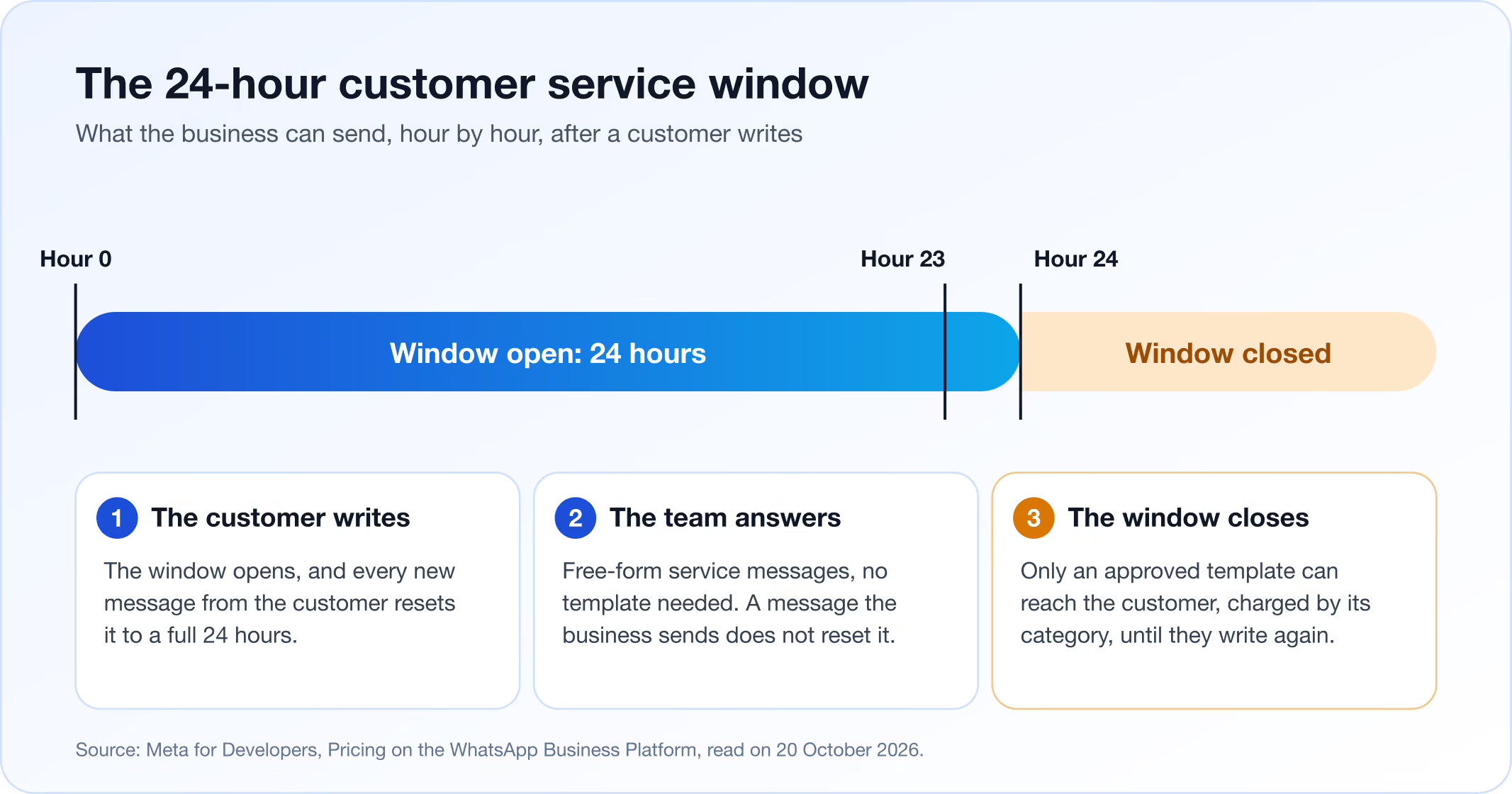
The customer service window opens when a customer messages the business. It stays open for 24 hours and resets with every new message from that customer. A message the business sends does not reopen it, and a closed window stays closed until the person writes again.
Inside the open window the business can answer with free-form service messages, no template needed. Outside it, the only way to message the customer is an approved template. That is the practical meaning of the window for a support team, and it is a rule of the platform rather than a setting of any software.
Because the reset belongs to the other side, speed matters. A message arrives at hour 0, the team replies at hour 23 with a plain service message, and nothing more comes in. The window still closes at hour 24, and the next message from the business has to be a template with its category and its charge. How a team plans staffing around delivery rules like this one is the subject of the omnichannel support guide.
Before 1 October 2026, service messages and utility messages sent inside the window were free, according to Meta's page: service messages from 1 November 2024 and in-window utility messages from 1 July 2025. That is no longer true. A utility message sent inside the window is charged, and the window now qualifies service messages for a free tier instead of making every service message free.
What reverses the rule: the free messages
Four conditions switch the charge off, and each has its own limit.
The first is direction. Messages from the customer to the business are never charged, in a window or out of one. Only delivered messages from the business to a user count.
The second is the free service tier. Service messages inside an open window are free for the first 1,000 per business phone number each month. The allowance applies from 1 October 2026 and it does not roll over. Counting is per number, so a second number has its own allowance and its own count. Beyond the allowance, each delivered service message is charged at Meta's published rate, and the account needs a payment method on file, because without one service messages stop being delivered after the free tier.
The third is the free entry point window. When a customer opens a conversation from a Click-to-WhatsApp ad, in the Android or iOS app, Meta opens a window of up to 7 days in which messages are free, except messages from the Meta Business Agent. The scope is narrow: it is a window opened by one kind of entry, not a general discount on ads.
The fourth is the status of the sender. Eligible governments and non-profits keep free service messages beyond the monthly tier, per Meta's page, through 31 December 2027.
Every free condition has an edge. The free service allowance is 1,000 per number per month and does not roll over. A free entry window ends after up to 7 days and does not cover Meta Business Agent messages. A utility message sent in the 24-hour window is charged even though it is inside it. And a template sent after the 24-hour window closes is charged by category and country, whoever started the conversation, unless a free entry point window is open.
A team answering inbound questions inside the window pays nothing for those service messages up to 1,000 per number each month. A team that starts conversations sends templates, and those are charged unless a free entry point window is open.
What changed on 1 October 2026
Two changes to what is free took effect on that date. Both are stated on Meta's page of 30 September 2026. Utility messages sent inside an open customer service window became charged, where since 1 July 2025 they had been free. For service messages inside the window, a free allowance of 1,000 per business phone number each month now applies, with no rollover.
Anyone searching for WhatsApp Business API pricing 2026 mostly wants these two facts. A cached post that says utility messages in the window are free describes the rules before the date, and nothing on it looks old. Meta's marketing site and its developer documentation did not carry the same text on the day this article was read, so this article follows the developer documentation and its stated update date. A pricing page with no date cannot be checked against Meta's.
How to estimate a month without quoting a rate
A monthly estimate needs counts, not prices, and the counts are all in your own history. The prices are filled in last, from the rate card, for the countries that appear in the counts.
The steps below turn that history into a list of lookups, and only the last of them uses a price.
- Divide a representative month of WhatsApp traffic into conversations the customer started and conversations the business started. The first group sits in the window, where service messages are free up to the monthly tier per number; the second is template traffic and carries a charge unless a free entry point window is open.
- Sort the template messages by type: marketing, utility or authentication. The type decides the line of the rate card, so a group that mixes types has to be split before it is priced. Utility messages sent inside the window belong here too, because they have been charged since 1 October 2026.
- Count service messages per business phone number and compare each count with the monthly free tier. A team with one number and light inbound traffic may never leave it, while heavy inbound traffic on one number will, and the part beyond the allowance is a line of its own.
- Split every group by recipient country calling code. This is the step most estimates skip, and it is where the total moves most, because two audiences of equal size can land on very different lines of the card.
- Price each group from Meta's rate card in the currency of your Messaging account, add any fee from the software or provider you use, and compare the total with the account's spend limit.
Response time belongs in the estimate: an answer inside the window avoids a template.
In RolChat's shared inbox, WhatsApp sits beside email and chat in one queue.
Volume tiers, rate cards and currency
Volume tiers apply to utility and authentication messages only. Marketing and service messages have none. Tiers are aggregated at the level of the business portfolio, not per number, they reset monthly, and only charged messages count toward them. Free messages do not move the count, because they were never charged.
The rate card is a lookup table: pick the recipient's market and the type, and the line gives the rate in the account's currency.
WhatsApp Business API pricing from a provider or software vendor
A business connects to the platform either directly or through a software vendor or provider, and the vendor may add its own fee on top of Meta's charge. That fee is the vendor's to set. It is not in Meta's documentation and it cannot be read from Meta's rate card.
There are therefore two documents to open, and they answer different questions. Meta's rate card says what a delivered message costs by type and country. The vendor's price list says what the vendor charges for its software, and whether it charges anything on messages themselves. The questions to put to a price list are narrow. Does the plan include WhatsApp, or is it a higher tier? Is any fee charged per message, per conversation or per phone number? Is Meta's charge passed through as it is or with a margin? Where does Meta's invoice go, and who holds the payment method? Each answer changes the total by a different mechanism. Read every list in the same unit: a fee per seat, a fee per company and a fee per message cannot be compared until each is converted to your own monthly volume, using the counts from the estimate above.
Billing and spend limits
Meta's charges run through Meta Business Suite, in the Billing Hub. Each Messaging account has its own billing and spend limits. A business with several accounts has several places to look.
The payment method matters more since 1 October 2026. The free service tier is conditional: without a payment method on the account, service messages stop after the first 1,000 per number in a month. A team that never expects to pay can still be cut off by an account with nothing attached.
A spend limit is the number to hold an estimate against. Set it above the estimate, with room for a busy month, and below the figure that would hurt. Meta's billing documentation is the place to check what a limit does, and it is better read before a campaign than during one.
The update calendar and notice periods
Meta changes pricing only on January, April, July and October. An estimate made in February holds until 1 April unless something is announced.
The notice period depends on what is changing. A new rate card comes with one month's notice, an add-on with three months, and a change to the pricing model with six. Meta's page gives the switch from conversations to delivered messages in July 2025 as its example of the six-month kind. A rate table printed in October is stale in January, and nothing on it would say so. A method does not go stale. The counts are yours and the card is Meta's. Compare the developer page's update line with the date of your estimate on each of the four dates, and redo the lookups when the line is newer.
Where RolChat fits
RolChat is the inbox side of the arrangement. WhatsApp is a channel in RolChat, and it starts at the Standard plan: Lite carries email and Telegram, while WhatsApp, SMS, Facebook, Instagram, Viber and LINE start at Standard. Plans are priced per company, not per agent, Standard is $49 a month, and there is a 30-day free trial with no free-forever plan after it.
The connection runs through Connect with Meta. In Settings, Channels, an owner or admin chooses the Meta business account, then the WhatsApp Business Account, then the phone number, and RolChat registers the webhook automatically. One phone number connects to one system only, so the number that belongs to RolChat has to be decided before the connection starts.
The platform rules in this article appear in the product as they are. The 24-hour window applies: free-form replies work inside it, and after it only an approved template can be sent. Templates are the only way an agent can start a WhatsApp conversation, and their approval status is synchronised from Meta. RolChat shows whether a message was sent, delivered or read, and delivered is also the event Meta charges on. Conversations auto-resolve after 20 hours, so a reopened conversation is still inside the window.
The plan price is RolChat's own number, listed on the pricing page. Meta's charge for a delivered message is read on Meta's rate card, and any other fee in the chain is read in the price list of whoever charges it.
Frequently asked questions
Is Meta WhatsApp Business API free?
No. Meta charges for each message a business sends to a customer and WhatsApp delivers, at a rate set by the message category and the recipient's country calling code. Some traffic is free: messages from customers to the business, service messages inside the 24-hour window up to the monthly free tier, and messages inside a free entry point window opened by a Click-to-WhatsApp ad, except messages from the Meta Business Agent.
Can I use WhatsApp Business API for free?
Only for a narrow pattern of traffic. If every conversation is started by the customer, the business answers inside the 24-hour window, and the count stays within the 1,000 free service messages per business phone number each month, Meta bills nothing for those messages. A payment method still has to be on the account, because without one service messages stop once the free tier is used. The software or provider you connect through may charge its own fee, and that is a separate line.
Why is WhatsApp API so expensive?
The total is the number of delivered messages multiplied by the rate for each message's category and recipient country, so it grows with the size of the audience and with how many of the messages are charged rather than free. A marketing message to a large list adds up because each delivered one is charged. A provider's own fee, where there is one, is added to Meta's charge.
How can I send 5000 WhatsApp messages at once?
A message to a customer whose window is closed has to be an approved template, and a promotional one belongs to the marketing category. Meta's rules also expect the recipient to have opted in. Every delivered message is charged at the rate for its category and country unless a free condition applies, so the cost of 5000 is read on Meta's rate card for the countries involved, and a message that is not delivered is not charged.
Which is the cheapest WhatsApp API?
For the message categories, Meta's part of the bill comes from one rate card, so the difference between options is what the provider or software adds: a fee for its own service, and whether Meta's charge is passed through as it is. Compare totals for the same volume, the same mix of categories and the same countries, with the vendor's own price list open beside Meta's rate card.

Writes about customer support operations, live chat, AI-assisted service and the tooling behind great customer experience.
LinkedIn